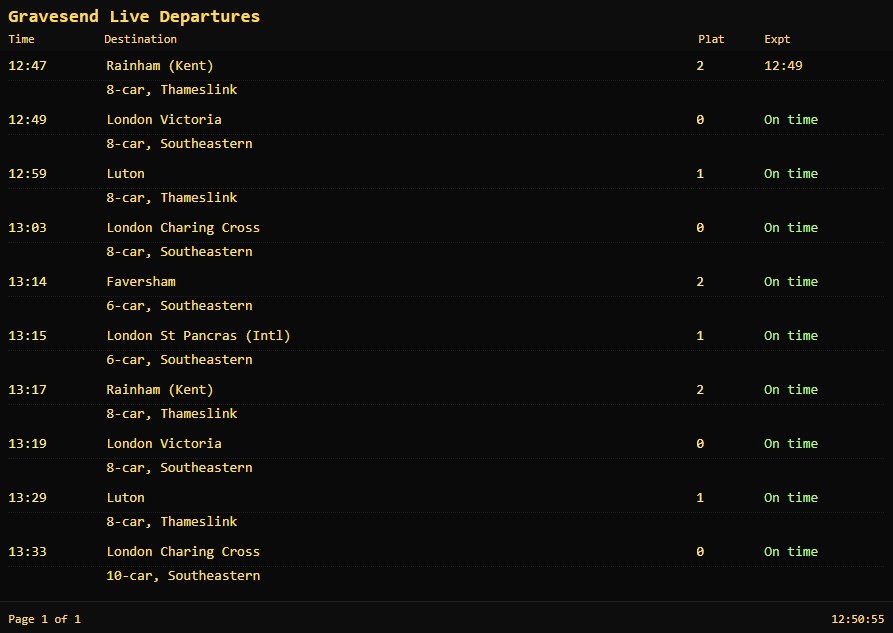

See the latest train departure times at Gravesend Station—refreshed continuously and styled like a classic British station board. If Gravesend isn’t your local station, no problem: you can select another station with the Station Selector beneath the board, or enter any UK three‑letter station code (CRS) to switch instantly.
What you’ll see on the board
- Live departures: scheduled time, platform, operator, and real‑time status (e.g., On time, Expected 12:34, or Cancelled).
- Calling points: a quick preview of the first stops where available.
- Smart layout: the board automatically adapts to small screens and sidebars, ensuring longer destination names stay readable.
Tip: The board title updates to show the full station name (e.g., “Paddington Live Departures”) so you always know which station you’re viewing.
How to choose a different station
- Use the Station Selector below the board.
- Type any CRS code (three letters) and press Update.
- Or click one of the quick buttons for popular stations.
Prefer a full‑page view? Click or tap anywhere on the board to open the dedicated page: /departure-board.
Frequently asked questions
How do I find my station’s three‑letter code (CRS)?
Most UK stations use a well‑known three‑letter code (e.g., EUS for Euston, VIC for Victoria). If you’re unsure, try the station name’s first letters, or search online for “<station name> CRS code”.
How often does the board update?
The page refreshes data automatically in short intervals, so you’ll see status changes (platforms, expected times, cancellations) without reloading.
Does the board show arrivals?
This view focuses on departures. If you’d like to see arrivals as well, let us know—we can add an arrivals tab or a toggle.
Having trouble?
If the board doesn’t load or looks unusual, try a hard refresh (Ctrl/Cmd + Shift + R) or check your internet connection. If you still have issues, please contact us and include your browser and device details.
Try it now
Head to the Station Selector below the board and enter your nearest station—then watch the departures roll in. If you travel regularly between a few places, bookmark the dedicated page: /departure-board.
Looking for a Platform board?
Try the Platform board here